
Updated on 27 October 2026.
Companies with an account at the Romanian State Treasury can make payments from it online, without going to the counter, using the electronic multiple payment order (OPME). The rules are set out in the Methodological Norms approved by Ministry of Public Finance Order no. 246/2005, art. 61, and businesses have been able to use OPME since 21 April 2020 (Order no. 1,819/2020, art. III). The paper Treasury payment order (OPT) can still be used (art. 61(14)).
Which payments you make from a Treasury account
In our experience, a company’s Treasury account is used in practice for payments to the state budget (taxes, contributions, fees) and for transfers to the company’s own bank accounts, not for payments to suppliers. Also from practice: statements for Treasury accounts are received in the ANAF online portal (SPV), so routine operations no longer require a visit to the Treasury.
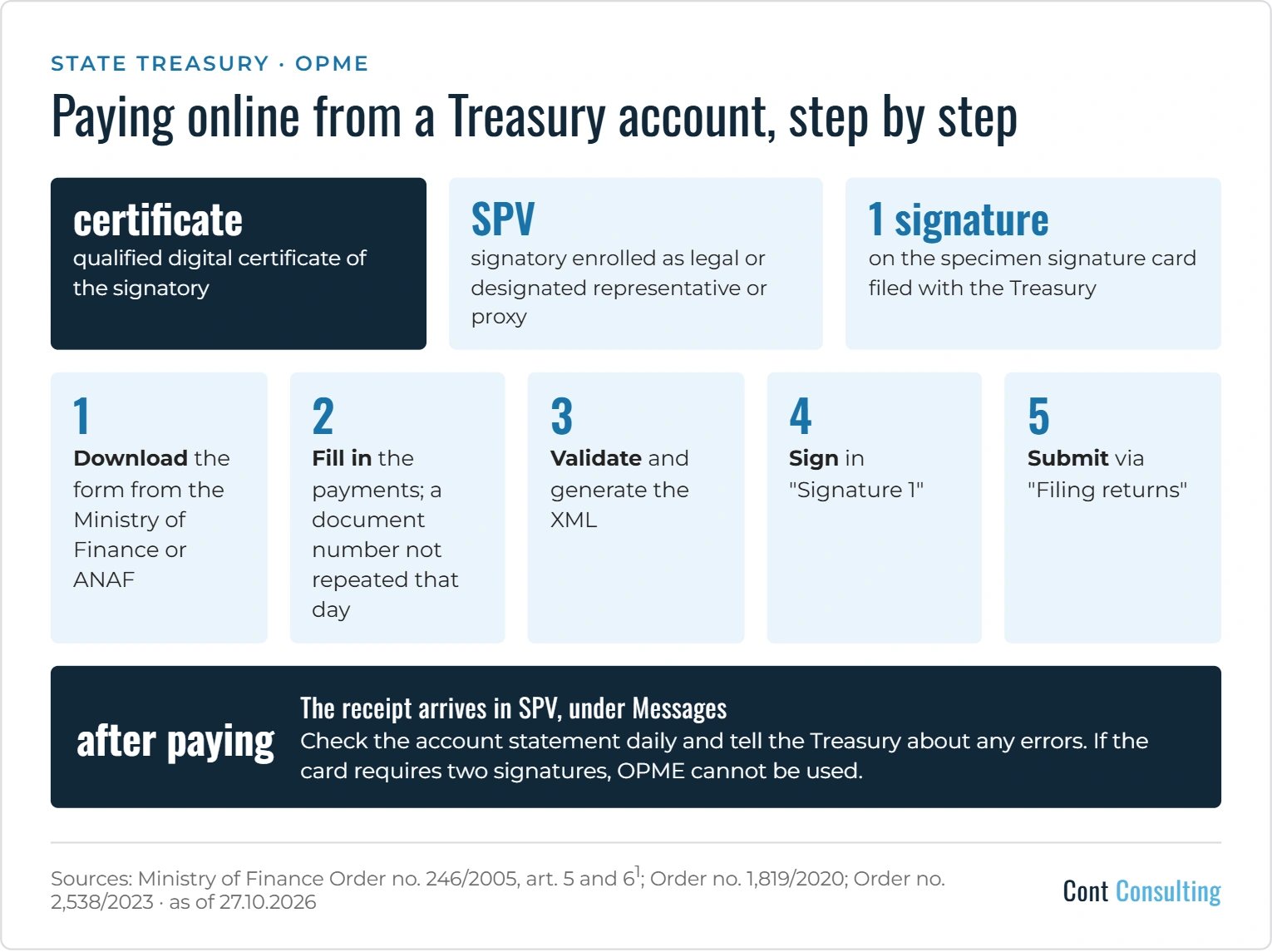
What you need
- a qualified digital certificate for the person who signs (art. 61(5)(r));
- that person must be enrolled in SPV as the company’s legal representative, designated representative or proxy (para. (7));
- the same person must appear on the specimen signature card filed with the Treasury; the check is automatic, based on the personal numeric code (para. (7));
- the card must allow payments with a single signature. If it requires two signatures, OPME cannot be used; you can file a new card, which applies from the next working day (para. (8), (9) and (11)).
The steps
- Download the form from the Ministry of Finance website (Forexebug – Public information – Forms) or from the ANAF portal (Online services – Electronic returns – Download returns) (para. (3)). Always use the current version.
- Fill in the header: under “Entity type” choose “Other entities”; the document number must be unique and cannot be repeated on the same day (para. (5)(a1) and (a2)).
- Fill in the payments: the IBAN of the Treasury account to be debited, the beneficiary, the beneficiary’s tax code and the beneficiary’s IBAN (para. (5)(i), (k)–(m)). For taxes and contributions collected by ANAF, the beneficiary is “Bugetul general consolidat” (general consolidated budget) and the beneficiary tax code is the company’s own tax code (art. 5(j) item 1 and (k) item 1, as amended by Order no. 2,538/2023). The “Adaugă OP” button lets you add several payments to the same document.
- Validate and generate the XML, then apply the electronic signature in the “Semnătura 1” field (para. (5)(r)). “Semnătura 2” is for public institutions only (para. (5)(s)).
- Submit the form through the “Depunere declarații” (filing returns) service (para. (3)). The filing receipt and the validation or rejection receipt appear in SPV, under Messages (para. (41)). If the signature does not match, the OPME is rejected and the receipt lists the errors (para. (12)).
After paying
- Check every day that the OPME payments appear correctly on the account statement; if you find Treasury errors, report them immediately (para. (15)).
- The person who signed is responsible for the payments, and the company is responsible for the match between the PDF and the XML (para. (10) and (13)).
What we recommend
- Keep the specimen signature card up to date, with a single signature if you want to use OPME.
- Use your own numbering for documents so that you do not repeat a number on the same day.
- Keep the signed PDF, the XML and the SPV receipts.
- Check the account statement after every payment.
We can help with payments to the state budget and SPV enrolment: see our accounting services.
Note: This text is valid on the date of its update, is for information only and reflects the interpretation of Cont Consulting specialists. It does not replace the legal provisions in force.
Sources: Methodological Norms approved by Ministry of Public Finance Order no. 246/2005, art. 5 and 61, as amended by Orders no. 1,819/2020, no. 1,459/2021, no. 115/2022 and Minister of Finance Order no. 2,538/2023 – as in force on 27.10.2026.